Brief
The Brief is your daily digest from Zinley — a short, readable summary of what happened and what needs you, written like a note from your agent. Open Brief from the sidebar.
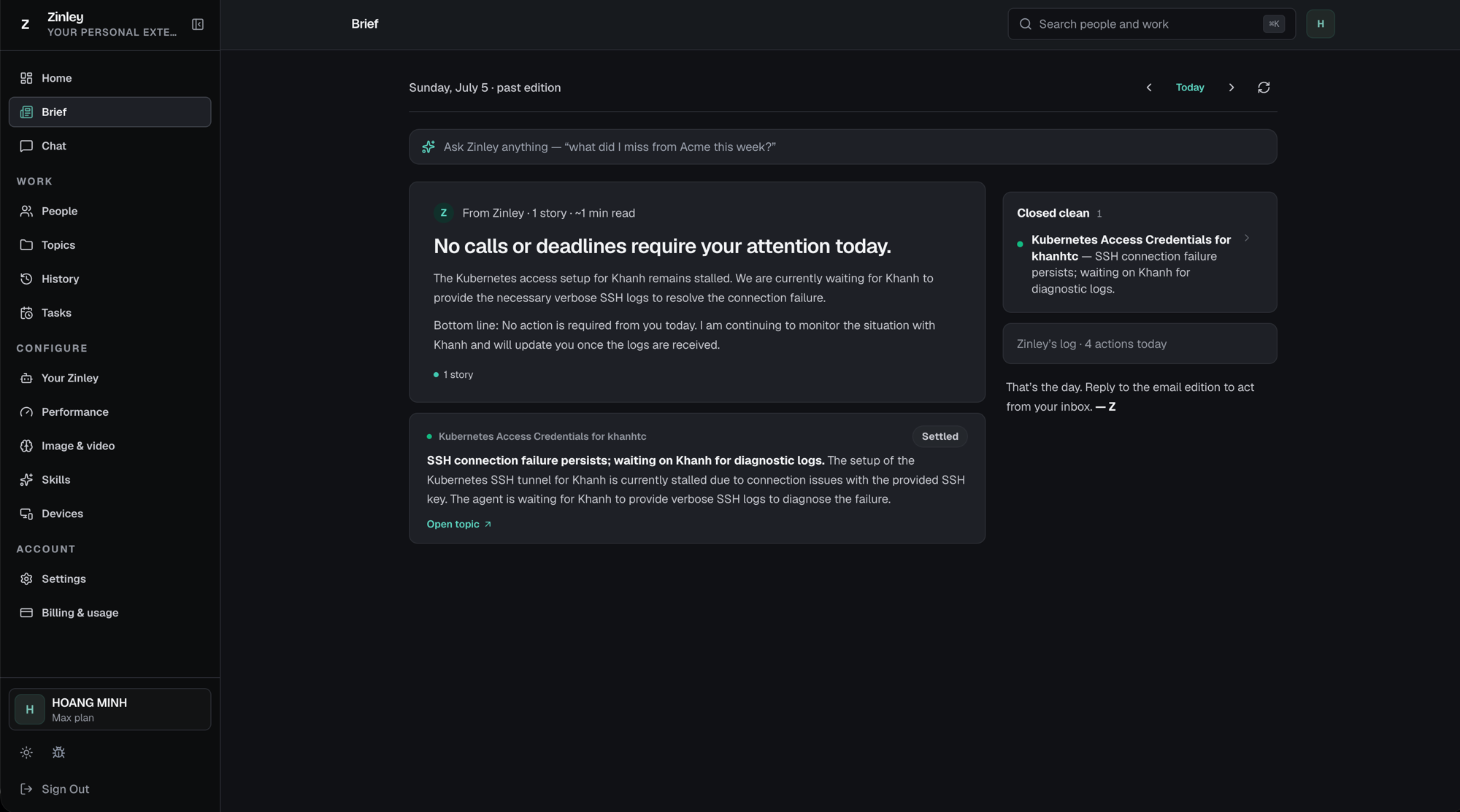
Moving between days
The header shows which edition you're reading — for example "Sunday, July 5 · past edition". Today's is the live edition and keeps updating through the day. The controls on the top-right let you move around:
| Control | What it does |
|---|---|
| ‹ (left) | Go to the previous day's edition. |
| Today | Jump straight back to today's live edition. |
| › (right) | Go to the next day's edition. |
| ⟳ Refresh | Rebuild the current edition with Zinley's latest activity. |
Ask Zinley anything
At the top is an "Ask Zinley anything" box — type into it like a chat to ask follow-ups about your brief, e.g. "what did I miss from Acme this week?" Zinley answers from everything it has handled, so you can dig into any story without leaving the page.
The edition (main column)
- From Zinley — the lead card. A one-line headline (e.g. "No calls or deadlines require your attention today."), a short write-up, and a bottom line telling you whether anything needs you. It's tagged with a story count and an estimated read time (e.g. "1 story · ~1 min read").
- Story cards — one per thing worth your attention, pulled from the calls and emails Zinley handled. Each shows the topic name, a status badge (e.g. Settled), and a headline plus summary of what happened.
- Open topic ↗ — on a story card, this jumps straight to that topic's full thread on the Topics page, so you can see the whole history behind the summary.
The wrap-up (right column)
- Closed clean — things Zinley finished on its own without needing you, with a count (e.g. "Closed clean · 1"). Click a row (the › chevron) to open it and see the detail.
- Zinley's log — every action Zinley took that day, with a count (e.g. "Zinley's log · 4 actions today"). Expand it to see the full list.
- Sign-off — a closing line from Zinley. You can also reply to the email edition to act straight from your inbox.
When there's nothing to report you'll see a quiet edition — "No calls or deadlines require your attention today."